
AI Design & Event Planning
Transform Any Space Instantly with AI
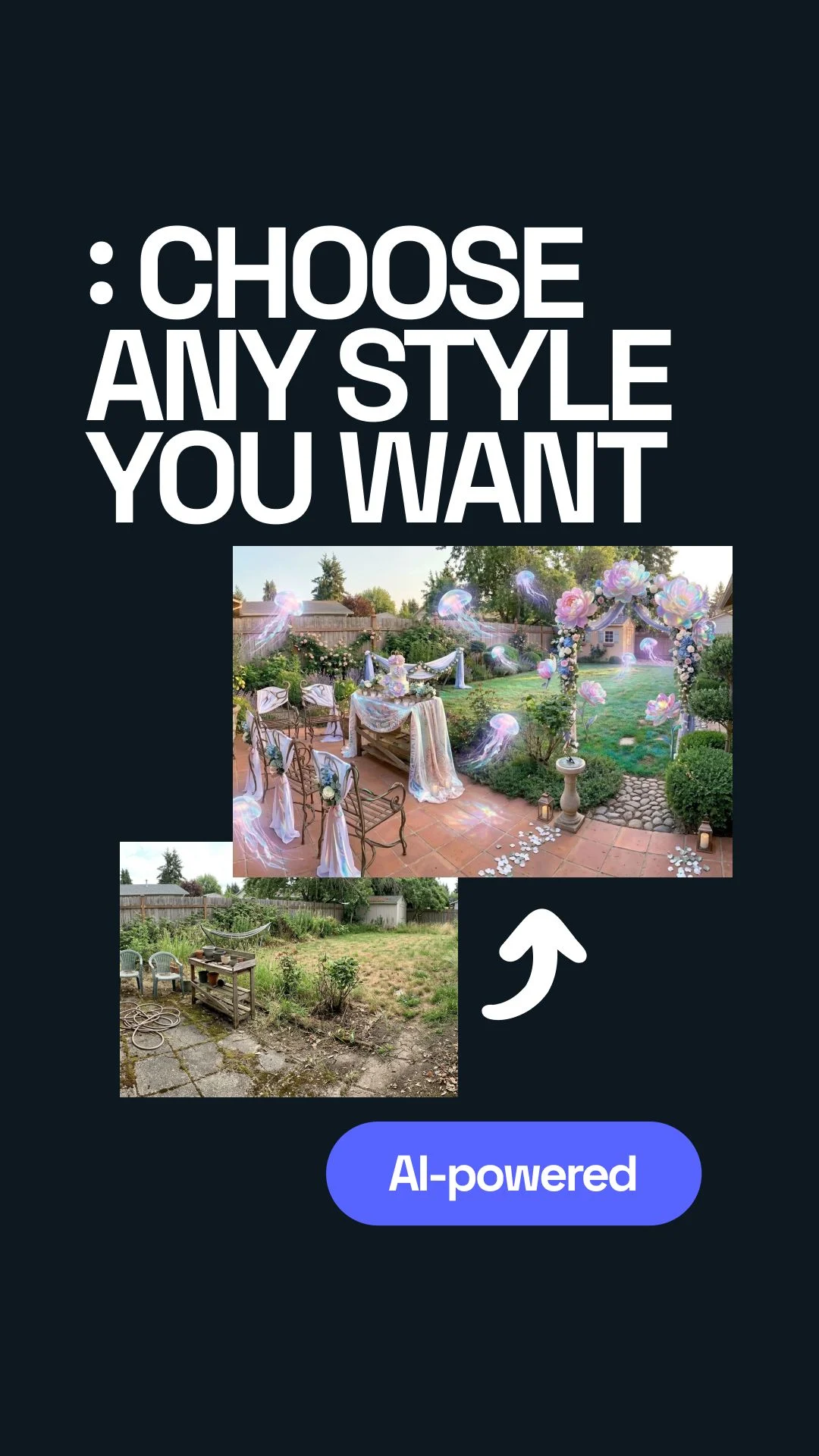
The first time I tried this, I was staring at a messy, overgrown spot and honestly thought, “fine, let’s see if AI can make this look like something I’d actually want to use.”
What surprised me wasn’t that it made the space prettier. It was how fast it helped me test moods, event setups, and style directions I would have never bothered sketching by hand.


How AI Space Transformation Works
I started with one simple photo and assumed the tool would just understand what I meant. It didn’t. The first outputs looked polished, but not right. They had that “nice image, wrong feeling” problem.
That was my first obvious mistake: I was asking for everything at once. Clean style, festive vibe, wedding mood, maybe a bit of Provence, maybe not too much. The result was visually impressive and kind of confused.
Once I slowed down and treated the process in steps, it got much better. First I picked a base direction. Then I looked at what changed. Then I added the event layer. That sounds basic, but in practice it saved me from chasing random pretty pictures.
Explore Popular Design Styles
Scandinavian
This was the first style that felt believable to me. Light, calm, a bit restrained. It didn’t scream for attention, which is exactly why it worked.
Provence
Warmer, softer, more romantic. Great when the place needs charm instead of perfection. I kept coming back to this one for engagement-style scenes.
Minimalist
I thought this would be the safest option, but it often made rough spaces look even emptier. Good when the bones are nice. Less forgiving when they are not.
Arabian
Rich, layered, dramatic. Beautiful when used on purpose. Easy to overdo if you push the decor too hard and forget the actual space underneath.
American
More direct, more familiar, often easier to picture for parties. Not the most subtle direction, but sometimes subtle is exactly not what the space needs.
Designing Spaces for Events
The useful part wasn’t only changing style. It was seeing the same place behave differently depending on the event. That changed how I looked at the whole tool.
- 🎂 Birthdays: good for testing how playful or busy the setup should feel before it turns into visual noise.
- 👶 Baby showers: useful when you want the space to feel soft and warm without becoming overly themed.
- 💍 Engagements: probably the easiest case to appreciate because lighting, pathways, and focal points matter immediately.
- 💒 Weddings: where I made another mistake by trying to jump straight to “final look” instead of checking layout, decor density, and mood separately.
My practical takeaway came earlier than the big insight: do not judge the first pretty result too fast. Ask whether it actually fits the event, or whether it is just a good-looking render.
The AI Workflow Explained
I expected this part to become effortless once I understood the order. Not exactly. Even after a few decent results, I still kept making the same mistake: giving vague instructions and then acting surprised when the output felt generic.
The more useful approach was boring in a good way. Be specific. Pick one direction. Compare two or three realistic versions. Then adjust. Tools like Uniify at https://www.uniify.space make sense when you use them as decision tools, not magic buttons.
Creative & Unexpected Ideas
One funny thing about this process is that sometimes the strange ideas are the ones that unlock the right direction. At one point I saw this weird floating-jellyfish-style concept and thought, okay, that is ridiculous.
Example: Airborne jellyfish-like decor in a party scene. Totally impractical as shown, but weirdly useful because it pushed me to think less literally about overhead decoration and movement.
That might sound silly, and honestly it was a little silly. But that was also the bigger insight, even if it only became clear later: AI is not only good at showing you the answer. It is good at showing you what direction feels wrong, exaggerated, too safe, or unexpectedly promising.
Frequently Asked Questions
How accurate are AI-generated designs?
Good enough to make decisions, not good enough to trust blindly. I treat them like visual drafts: useful for direction, not final construction documents.
Can I combine multiple styles?
Yes, but that is also where things go off the rails fast. I had better results by choosing one strong base style first and only then mixing in a second influence.
Is this useful for professionals?
Yes, especially for fast concept testing. It is also useful for non-designers because it helps you react to something visible instead of trying to imagine everything in your head.