
I Tried to Make My House Look Better With AI. I Got a Few Things Wrong First.
I did not start with a big renovation plan. I started with one photo of the house, a messy idea in my head, and the hope that I could make the outside look better without spending stupid money.
The useful part was not that AI made a “perfect design.” It was that it helped me see small changes before I bought lights, paint, plants, or anything else.



What happened first
I was looking at the front of the house one evening and it just felt flat. Not terrible. Not broken. Just flat.
The funny thing is, during the day I did not notice it that much. But at night, the front looked like nobody had thought about it. The path disappeared. The bushes looked like one dark block. The facade had no shape.
So I took a photo and uploaded it into an AI design tool. I used Uniify because I wanted the process to feel more like a chat than like complicated design software.
The AI asked a few simple questions. What style did I like? Did I want small changes or a full redesign? What budget did I have? That part helped more than I expected, because I had not actually decided what I wanted.
The first mistake: I asked for too much
My first prompt was bad. I basically asked the AI to make the house look “modern and expensive.” That sounds fine, but it is too vague.
The result looked nice, but it also looked like a different house. New facade. New windows. New garden. New everything. Great image, useless plan.
What I asked first
“Make this house look modern, premium, and beautiful.”
What I should have asked
“Keep the house the same. Only add cheap exterior lighting, small plants, and simple facade details.”
That was the first lesson. If you ask for a dream version, AI gives you a dream. If you ask for a realistic version, it can give you a shopping list.
What AI actually helped with
After I stopped asking for magic, the results got better.
I uploaded the same photo again and told the AI to keep the structure as it was. No new roof. No new windows. No fantasy stone wall. Just cosmetic changes.
Use your real photo
Do not use a perfect inspiration image first. Use the actual front of your house.
Limit the change
Tell the AI what not to change. That matters more than people think.
Ask for buyable ideas
Lights, paint, plants, numbers, door color, planters, path edges. Real things.
The practical takeaway came early for me: do not use AI as a designer with unlimited money. Use it like a preview tool before going to the store.
The lighting lesson
I expected paint to make the biggest difference. I was wrong.
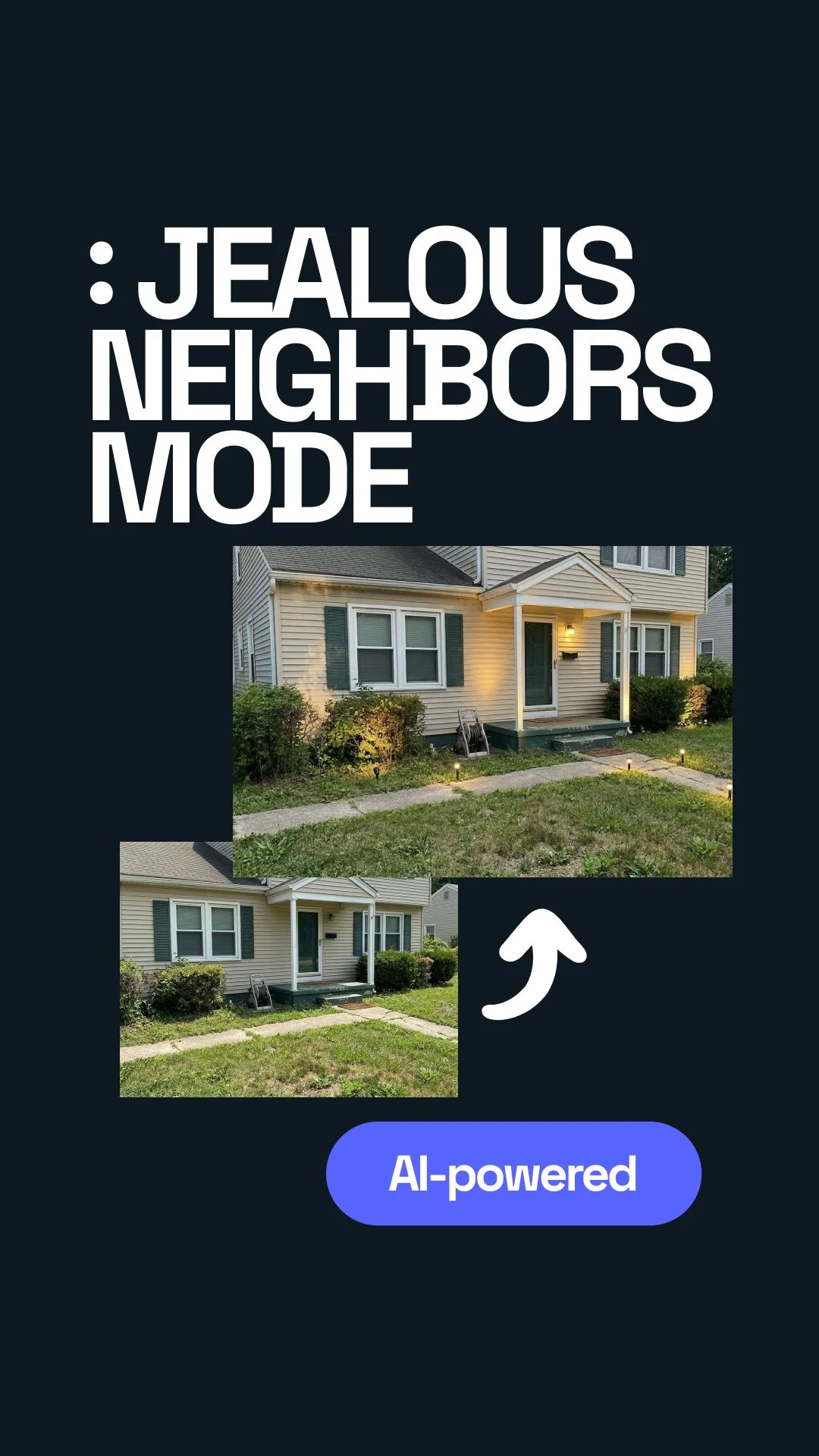
The first version that really made me stop was the one with small lights along the path and a few lights pointed toward the bushes. Nothing huge. No big construction. Just light in the right places.

Image: Unsplash. Visual example of warm exterior lighting; check license terms before commercial reuse.
I had seen solar lights before in stores, but I always thought they looked a bit random. Like something you stick in the ground and forget about.
The mistake was not the lights. The mistake was placing them without a plan.
This is where the AI image helped. It showed me where the light should land. Not just where the light should sit.
What I would buy first
I would not buy everything at once. That is another mistake I nearly made.
When you see a nice AI render, it is easy to think you need the whole set: lights, paint, pots, plants, maybe a new door color. But the better way is slower.
First $100
- Solar path lights
- Two small uplights for bushes or facade texture
- Fresh mulch or clean edging
Next $300–$500
- Paint touch-ups
- Modern house numbers
- Simple planters
- Better front door color
My simple rule now is this: start with the things you can move, return, or replace. Lighting is perfect for that. Paint is stronger, but it is less forgiving.
The second mistake: I trusted the pretty image too fast
One AI version looked great, but when I looked closer, it had added things that made no sense for the real house.
There was a light where there was no outlet. A planter that blocked the walkway. A shadow that looked amazing in the image but probably would not happen in real life. I generally thought, “Okay, this is the one,” and then five minutes later realized I would have bought the wrong stuff.
That sounds obvious, but it is easy to forget when the picture looks finished.
The prompt I would use now
This is the version I wish I had started with:
Then I would ask one more thing:
That second prompt matters. Otherwise the result can become a shopping fantasy.
The main insight, but not in a dramatic way
I used to think curb appeal was about making the house “beautiful.” Now I think it is more about making the house readable.
At night, can you see the path? Does the entrance feel clear? Do the bushes have shape? Does the facade have depth? Does one thing pull your eye in?
That is why small lights can beat big changes. They help people understand the house.
Before
Flat front, dark path, bushes blending into one shape, no clear focus.
After
Visible path, soft shadows, warmer entrance, better shape, more depth.
And yes, maybe later I would repaint the facade. But I would not start there anymore.
FAQ
Should I start with AI or go straight to the store?
Start with AI. Even one rough preview can stop you from buying random lights or decor that does not work together.
Do I need expensive outdoor lighting?
No. For a first test, simple solar lights are enough. The placement matters more than the price.
What should I tell the AI?
Tell it your budget, your style, and what must stay the same. Also tell it to suggest realistic changes you can actually buy.
Is repainting the facade worth it?
It can be, but I would test smaller changes first. Lighting, cleaning, plants, and house numbers can already change the feeling a lot.
Final takeaway
I went into this thinking AI would give me one perfect answer. It did not.
What it gave me was something more useful: a way to make mistakes on screen before making them in the real world.
The biggest lesson is simple. Do not ask AI to redesign your whole house first. Ask it to help you improve what is already there.
Start with one photo, one budget, and one small goal. Use Uniify to test the look. Then buy the first few things only after the idea makes sense in the image and in real life.
That is not as exciting as a full renovation. But honestly, it is probably how most good upgrades actually happen.